Proptech SaaS Case Study
About 4× estimated effective
delivery capacity
Same team size · Already using AI · March vs January
 GenieWorks
Your AI as an Engineer inside Jira, GitLab, or GitHub
GenieWorks gives your AI an engineer’s mindset. It challenges requests that won’t solve the real problem, recommends a better approach, and checks the result against what your team agreed.
 Jira Product / APP-42 GenieWorks
Activity Comments & history
Specification
Assigned to GenieWorks
Specification started · Investigating export retries
Pulled live evidence via MCP
Sentry One click, a lost response, then two export jobs.
Internal API Same user and export settings; the retry has a new request ID.
Needs input · During specification
A button lock won’t cover network retries. Should a retry return the original export?
Yes, reuse the same export. @Sam, please confirm from QA.
Agreed. Only “New export” creates another. Test retries after a lost response.
Specification updated · Ready for review
Original request Disable Export after the first click.
Live evidence · Sentry + your Internal API Sentry traces link one click to a lost response and two jobs. The internal service confirms a new request ID on retry for the same user and export settings. These authorized MCP reads supply context the repository alone cannot show.
Agreed behavior Keep the same export across clicks and network retries. Create another only through “New export”.
QA verification added Simulate a lost response, retry, and check that the original export is returned.
Implementation
Assigned to GenieWorks
Spec approved · Implementation started
PR #84 opened · Implementation complete
Gap found and fixed The API reused the export, but the Web retry generated a new request. Corrected before opening the PR.
Verified against the agreement Lost-response retries reuse the export. An explicit new export creates another.
Review scope This example has AC review enabled. Human review and release approval remain separate.
Please also link the retry message to the existing export.
PR #84 updated
Acceptance review enabled
Explore implementationCode assurance
Assigned to GenieWorks
Code assurance started
9 scenarios reviewed · 1 supported finding
The planned retry cases show no gap. The problem appears when cleanup overlaps a long-running export.
Retry record removed while export is still running
Cleanup can expire the retry record before the export finishes. A late retry then has a path to create a second job.
8 scenarios without a finding in source review First export; repeated click; lost-response retry; retry after completion; explicit new export; concurrent retries; permission denial; worker restart.
Scenario 9 · Long-running export + cleanup + late retry Cleanup expires retry records by age while the worker can still be processing the linked export. The agreed cases did not cover that overlap.
Proposed verification Keep an export running beyond retry-record retention, run cleanup, then retry. Verify it returns the existing job. These steps have not been executed.
9 scenarios analyzed in source · Application, API, and browser tests have not been run in this example.
Explore code assuranceAPP-73 · Propose customer self-service onboarding
Project proposal
Assigned to GenieWorks · Ran “Create Project Proposal”
Saved team recipe · Inputs: self-service onboarding, enterprise customers
We can reuse account provisioning. Public signup adds billing and abuse controls. Start with an invited enterprise pilot?
Yes, pilot first. @Alex, can we keep our current account approval?
Yes. Reuse provisioning and manual approval. Add guided setup after the invitation.
Project proposal ready for review
Scope · Invited enterprise pilot Reuse provisioning and account approval. Build guided setup and invitations. Public signup, billing changes, and abuse controls stay outside the pilot.
Delivery phases Validate the onboarding journey, deliver setup across Web and API, then onboard the first invited customers.
Success and risks Customers finish setup without developer intervention. Measure completion and support requests; check account permissions before pilot launch.
Decision still needed Product selects pilot customers and launch timing. The proposal is ready for review, not approved for delivery.
Your recipe defines the inputs, investigation, and deliverable. The team can run it again on the next proposal.
Explore custom workflowsProject workspace Lessons & decisions
GenieWorks & project leads · Shared learning review
Project learning
I reviewed 18 tickets I worked on, bugs filed afterward, and changes to Jira and Git after my implementation.
I missed a lifecycle case
APP-31 led to bug APP-57. Alex’s corrective PR #79 keeps retry records until the export finishes. My spec covered retries, but missed cleanup while a job was still running.
Yes. Apply that lesson to background jobs with retries, not every API endpoint.
Agreed. Keep “New export” as an explicit new action.
Lesson checked, adopted, and applied
Evidence behind the lesson Compared APP-31’s original spec and PR #62 with later bug APP-57, the Jira correction, and Alex’s corrective PR #79. The changed behavior belonged to the original scope; this was not a new feature or release cherry-pick.
What I now check For retryable background jobs, specify what happens when cleanup overlaps a running job and a late retry. Keep request identity until the job finishes; preserve an explicit new action.
Checked before reuse Replayed the original ticket: the proposed lesson adds the missing acceptance and test scenario. Checked a read-only request too: this lesson does not apply.
Applied on APP-86 The next export specification includes the cleanup, running-job, and late-retry scenario, with a link to this approved lesson. Future reviews check whether the lesson was useful or needs refining.
Lessons checked against outcomes, reviewed with leads, and reused where they fit.
Explore knowledge & learningYour model · Your infrastructure · Shared team context
Jira GitLab
 GitHub Issues
 Codex
Codex Claude
 Qwen
QwenA strong, fast-moving Proptech SaaS team already used AI in daily development. GenieWorks brought that capability into a shared engineering process: investigated requests, clear agreements, and implementation reviewed against the intended outcome.
Project context and decisions carried through the work, giving the whole team a common way to deliver with AI.
Read the case study and how it was estimatedAbout 4× estimated effective
delivery capacity
Same team size · Already using AI · March vs January
A stronger model can build the wrong solution exceptionally well.
GenieWorks investigates the evidence, questions assumptions, and brings doubts to your team. When a decision needs your input, it asks. Together, you clarify what should change and why. That agreement guides implementation and review.
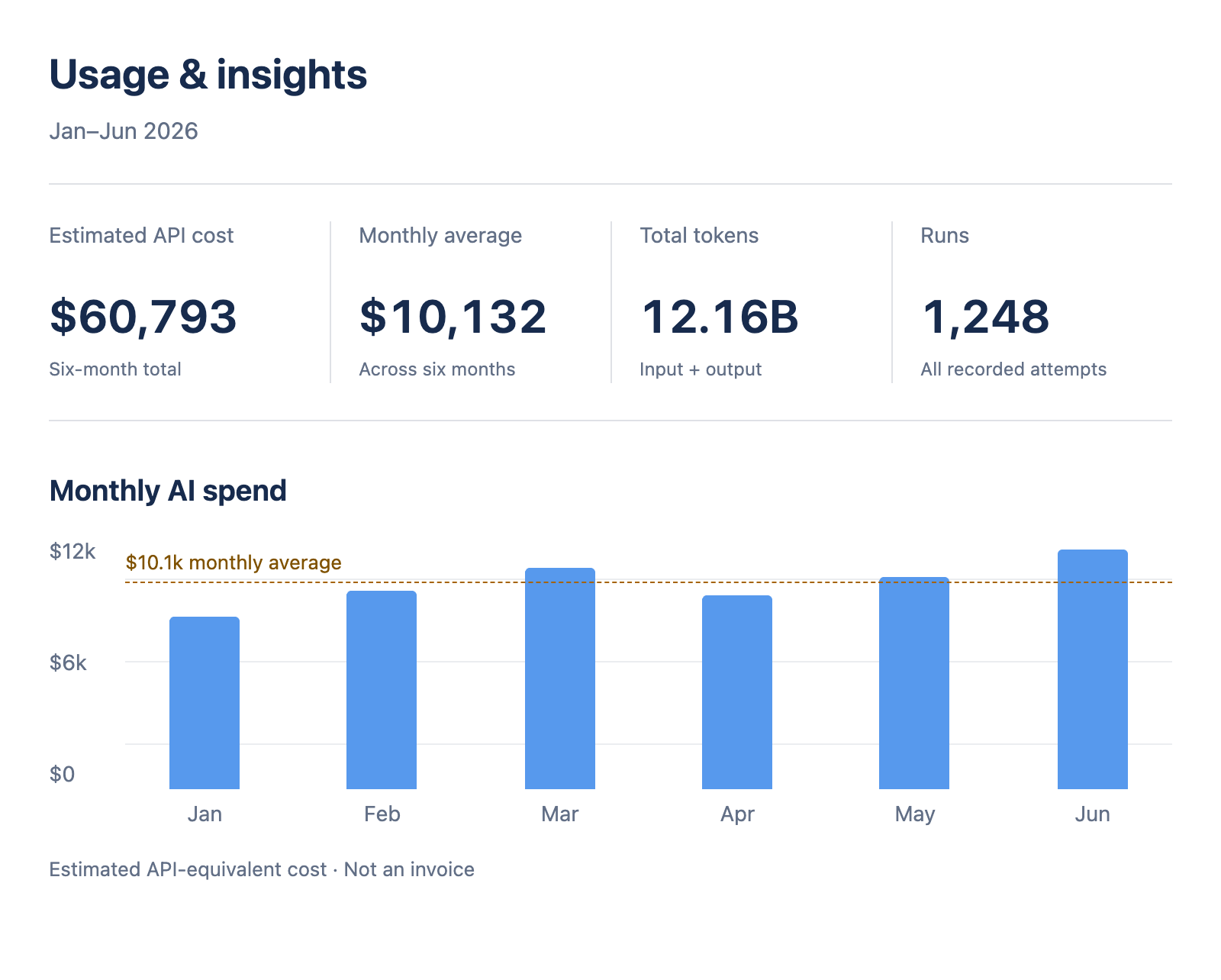
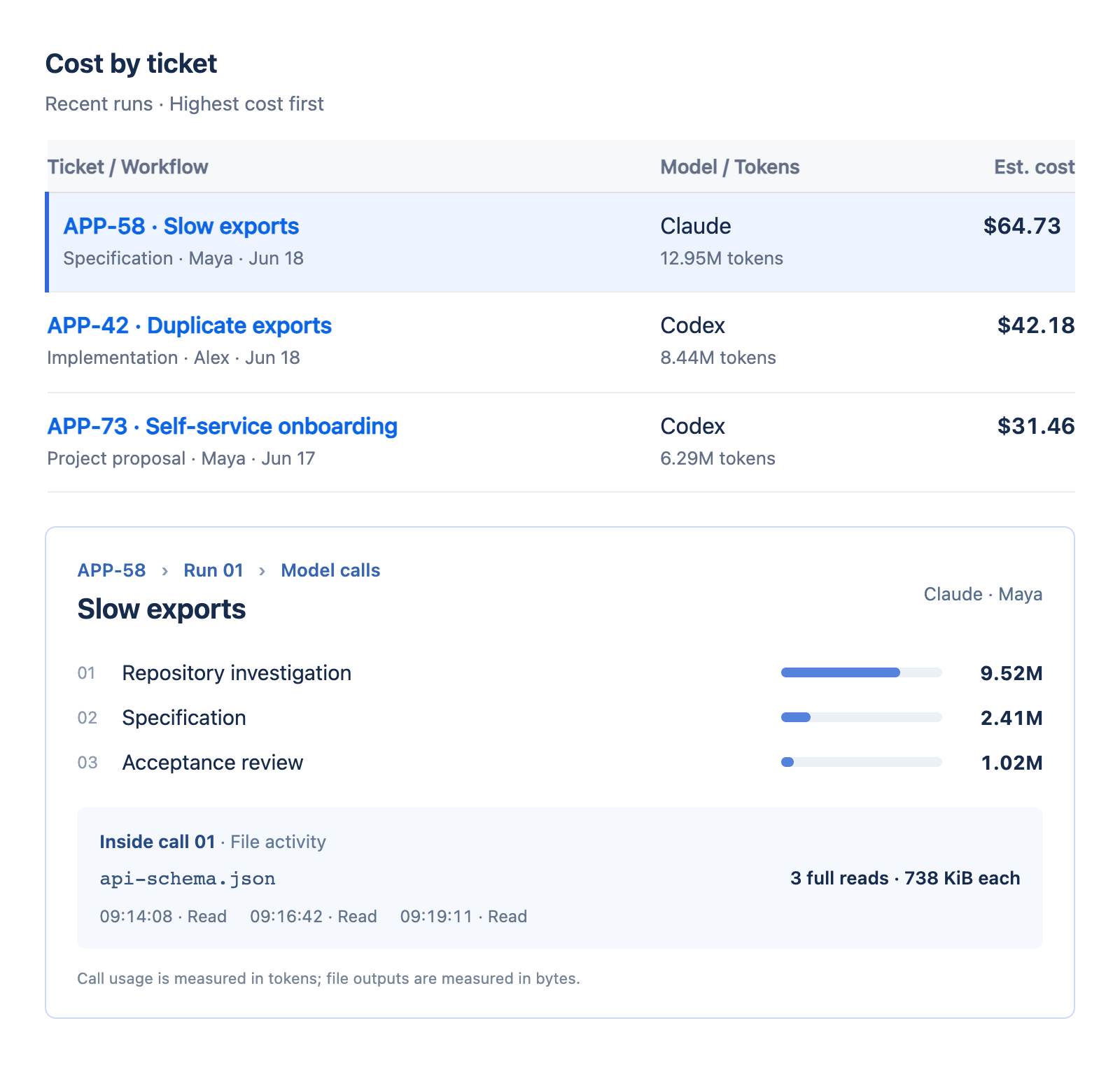
See where the effort went, from overall spend to the ticket, model calls, and recorded activity.
SpendTicketModel callActivity
Open a ticket to see who started the work, which model ran, and how usage breaks down across investigation, specification, and review.
Inside the example
APP-58 used $64.73. About 74% of its tokens went into investigation. The activity shows the same API schema read three times.
That gives your team a specific pattern to investigate, improve, and compare on the next run.
GenieWorks keeps questions, evidence, and decisions on the issue, where teammates can contribute and understand why an approach was chosen.
Those agreements guide implementation and review. Progress, checks, and open questions stay visible. Corrections become reviewed lessons for future work.
See the evidence, questions, and agreements behind the chosen approach.
See what changed, what was checked, and what still needs attention.
Corrections become reviewed lessons that shape how similar tasks are handled.
PRICING
The same full suite at every team size. Pricing follows your Jira site’s user count.
| What’s included | |||
|---|---|---|---|
| Project knowledge | Included | Included | Included |
| Specification | Included | Included | Included |
| Implementation & review | Included | Included | Included |
| Code assurance | Included | Included | Included |
| Usage & cost reports | Included | Included | Included |
| Priority support | — | — | Included |
| SLA | — | — | Included |
| Single sign-on (SSO) | — | — | Included |
| Custom models | — | — | Included |
| On-premise installation | — | — | Included |
| Licensed Jira users | Total USD / month |
|---|---|
| 1–10 | $60 |
| 11–15 | $195 |
| 16–25 | $325 |
| 26–50 | $650 |
| 51–100 | $1,300 |
| 101–200 | $2,600 |
| 201–300 | $3,900 |
| 301+ | Let’s Talk |
Jira pricing · USD. Full-suite totals for the whole Jira site at each tier’s maximum user count. The standard $13/user rate applies above 10 users.
Model-provider charges are separate. All licensed Jira site users count.
Jira pricing · USD. For GitLab or GitHub, talk to us .
On-premise execution: AI runs in your environment; coordination stays hosted. Deployment details
GenieWorksFor teams evolving an existing product, where shared context, review, and a clear definition of done matter.